Dynamic Html content
The previousd example was all fixed content, it could just have been the standard components rather than html. The HtmlFragment has 2 attributes that support the use of dymamic content in the document.
- contents - This can dymanically bind to an object, property or xml parameter, or the content of a datasource.
- source - This can point to a file or url that provides html content.
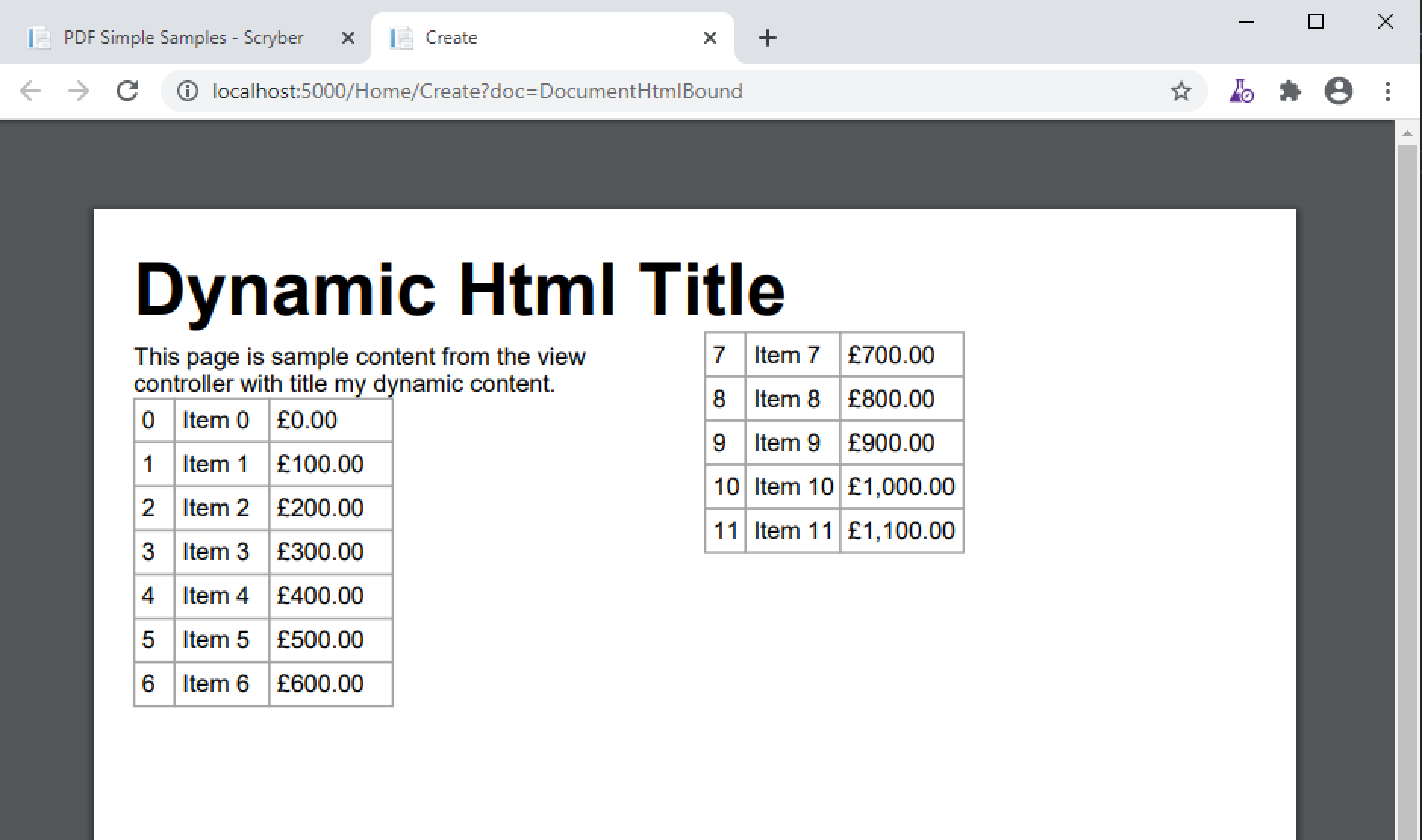
In this example there is an xml parameter containing xhtml that could be changed at generation time. See Binding to paramters and the model for more information. And the html partial source from an MVC controller method.
Template Definition
<?xml version="1.0" encoding="utf-8" ?>

<doc:Document xmlns:doc="http://www.scryber.co.uk/schemas/core/release/v1/Scryber.Components.xsd"
            xmlns:styles="http://www.scryber.co.uk/schemas/core/release/v1/Scryber.Styles.xsd"
            xmlns:data="http://www.scryber.co.uk/schemas/core/release/v1/Scryber.Data.xsd">
<Params>
    <doc:Xml-Param id="title" >
    <h1>Dynamic Html Title</h1>
    </doc:Xml-Param>
</Params>

<Pages>

    <doc:Section styles:margins="20pt" styles:font-size="12pt">
    <Content>

        <!-- Fragment bound to the xml 'title' parameter -->
        <doc:HtmlFragment source="" contents="{@:title}" />

        <!-- Fragment that comes from an MVC Controller method with a name parameter -->
        <doc:Div styles:column-count="2" styles:height="200pt">
        <doc:HtmlFragment source="http://localhost:5000/Home/html?name=my%20dynamic%20content" />
        </doc:Div>

    </Content>
    </doc:Section>

</Pages>

</doc:Document>
MVC Controller method
In the controller define a method that returns the data content for the source. This could be from any content or call other services.
public IActionResult Html(string name = "Other")
{
    var data = new Models.DataContentList();
    for(var i = 0; i < 12; i++)
    {
        data.Add(new DataContent() { ID = i.ToString(), Name = "Item " + i.ToString(), Price = i * 100 });
    }
    this.ViewBag.Name = name;
    return PartialView("HtmlContent", data);
}
Partial View Content
And define the partial view that returns the rendered content required.
@model Scryber.Core.Samples.Web.Models.DataContentList
<p>This page is sample content from the view controller with title @ViewBag.Name.</p>
<table>
@foreach (var item in Model)
{
<tr>
<td>@item.ID</td>
<td>@item.Name</td>
<td>£@item.Price.ToString("#,##0.00")</td>
</tr>
}
</table>
Output content
And the final rendered content should consume the html feed and render within the columns of the div.